01 Create an Organization & Log In
Go to code.helixor.dev to create an organization and log in. Once registered, you can manage your team and access shared workspaces. You will connect this account to your local development environment during helixor init after installing the CLI.
02 Operational Modes
Helixor Code operates across two flexible tiers designed to meet teams wherever they are in their AI adoption journey:
Augment Mode · Free · No Key
Drop into your existing agent
Attaches to Claude Code, Codex, Antigravity, Grok, or Qwen via local MCP. The agent brings its model; Helixor provides structural code search (code.search, code.impact.analyze) and stateful TODO stacks (brain.todo). Saves 6×+ token overhead by substituting AST motifs for whole-repo file dumps.
Orchestrate Mode · Enterprise · BYOK
Governed multi-LLM operational pipelines
Runs checkpointed, resumable operational pipelines where specialized models handle specific steps (Claude verifies plans, human approves at the gate, Codex or Grok implements and audits) on your own keys with audit trails and shared team memory.
See detailed architecture in How It Works or review the Documentation Overview.
03 Prerequisites & Installation
Helixor Code runs on macOS (companion daemon + menu-bar tray app) and Linux (headless systemd service + HTTP status API). Requires Python 3.11+.
Standard Installation via PyPI (Recommended with pipx):
pipx install helixor
pip install --user helixor
Air-Gapped / Offline Installation:
cd helixor-wheelhouse
./install.sh
The installer automatically provisions an isolated environment at ~/.helixor-cli and links the binary onto your PATH. For full installation options and requirements, see the CLI Reference Docs.
04 First-Time Setup (helixor init)
Run the guided, interactive setup command to configure your local companion, background daemon, and project roots in one step:
helixor init
What helixor init configures:
- Identity & Login: Sets up local credentials or runs offline with
--skip-login.
- Source Roots: Registers your repositories (e.g.
~/code).
- Local Companion: Starts the unified local MCP listener.
- Autostart Service: Configures a persistent user service (
LaunchAgent on macOS, systemd on Linux).
- Menu-Bar Tray: Launches the companion app with real-time token savings and health metrics.
- Agent Detection: Detects installed coding agents (Claude Code, Codex, Antigravity, Grok, Qwen) and configures MCP automatically.
Common Setup Flags:
helixor init --source-root ~/code
helixor init --skip-login
helixor init --source-root ~/code --index-strategy eager
helixor init --hub https://code.helixor.dev --organization-id org_12345
Detailed flags and environment variables are documented in CLI Lifecycle Documentation.
05 System Health & Diagnostics
Verify that your companion daemon and agent MCP registrations are fully operational:
helixor doctor
helixor doctor validates CLI release train, background daemon status, source roots, MCP tool responsiveness, and cloud portal sessions. For quick runtime endpoint status:
helixor status
helixor status --json
Read more in Health & Diagnostic Commands.
06 Connecting Your AI Coding Agents
Helixor Code integrates with any MCP-compliant agent, IDE, or CLI. Each agent receives specialized rule files and instruction sets:
Claude Desktop & Claude Code
helixor agent install claude
helixor claude install
Codex
helixor agent install codex
Cursor IDE
helixor mcp-config
Google Antigravity, Gemini, Grok & Generic MCP Clients
helixor agent install antigravity
helixor agent install gemini
helixor agent install grok
helixor agent install mcp-generic
See instructions for each agent runtime in Agent Rules & MCP Integration Guide.
07 IDE Plugins (VS Code, Cursor, JetBrains)
Bring living structural indexes, code quality findings, and TODO stacks directly into your editor sidebar:
- VS Code / Cursor: Search for "Helixor Code" in the Marketplace or install from
.vsix.
- JetBrains (IntelliJ, PyCharm, WebStorm): Search "Helixor Code" under Settings → Plugins or install from
.zip.
- Adopt Workspace: Run Cmd/Ctrl+Shift+P → Helixor: Adopt Current Workspace.
- Push TODO from Selection: Highlight code and trigger Helixor: Push TODO Stack from Selection to anchor tasks directly to code symbols.
08 Repository Indexing & File Watching
Helixor uses lazy on-demand indexing by default, but you can build or rebuild indexes explicitly:
helixor index /path/to/your/repo
helixor index ~/code/project --index-strategy eager
helixor index ~/code/monorepo --single-index
helixor index-reset --yes
helixor up automatically starts a background debounced filesystem watcher. Modifying files refreshes indexes incrementally.
Learn how AST indices, freshness hashes, and project roots work in Code Indexing Documentation.
09 Day-to-Day Companion & Menu-Bar Tray
Control the companion daemon lifecycle with simple commands:
helixor up
helixor down
helixor status
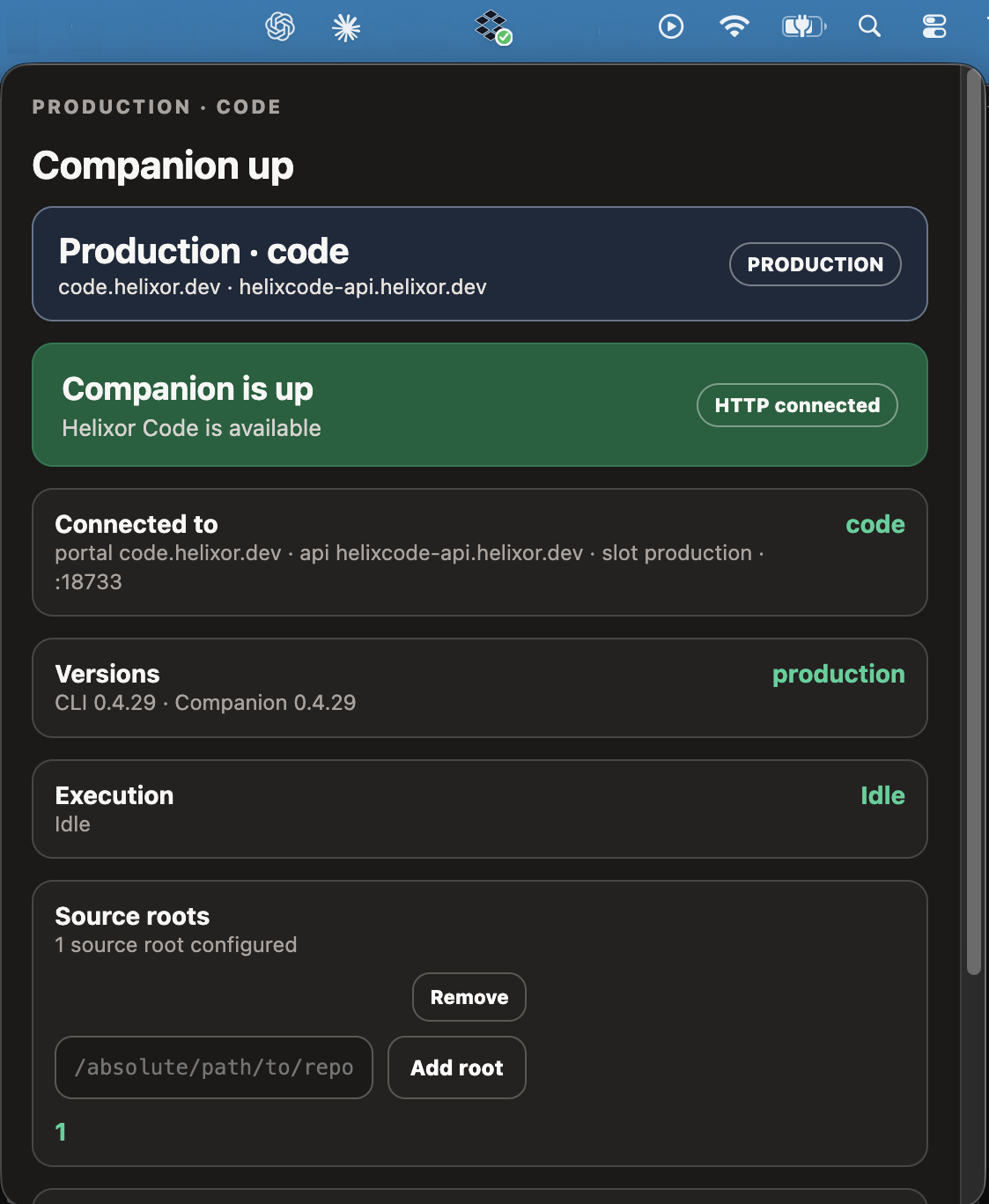
macOS Menu-Bar App Features:
- Health Indicator: Real-time status (Healthy, Busy, Offline).
- Token Savings Meter: Live counter of tokens consumed vs. tokens saved (averaging 6×+ reduction vs. raw grep).
- Active TODO Stacks: Live view of in-flight TODO frames and design state.
- Workflow Gate Watch: Monitor and approve pending operational pipeline approval gates.
macOS Menu Bar Tray
COMPANION UP
Local Desk at 127.0.0.1:18733/desk
TODOs & STACKS
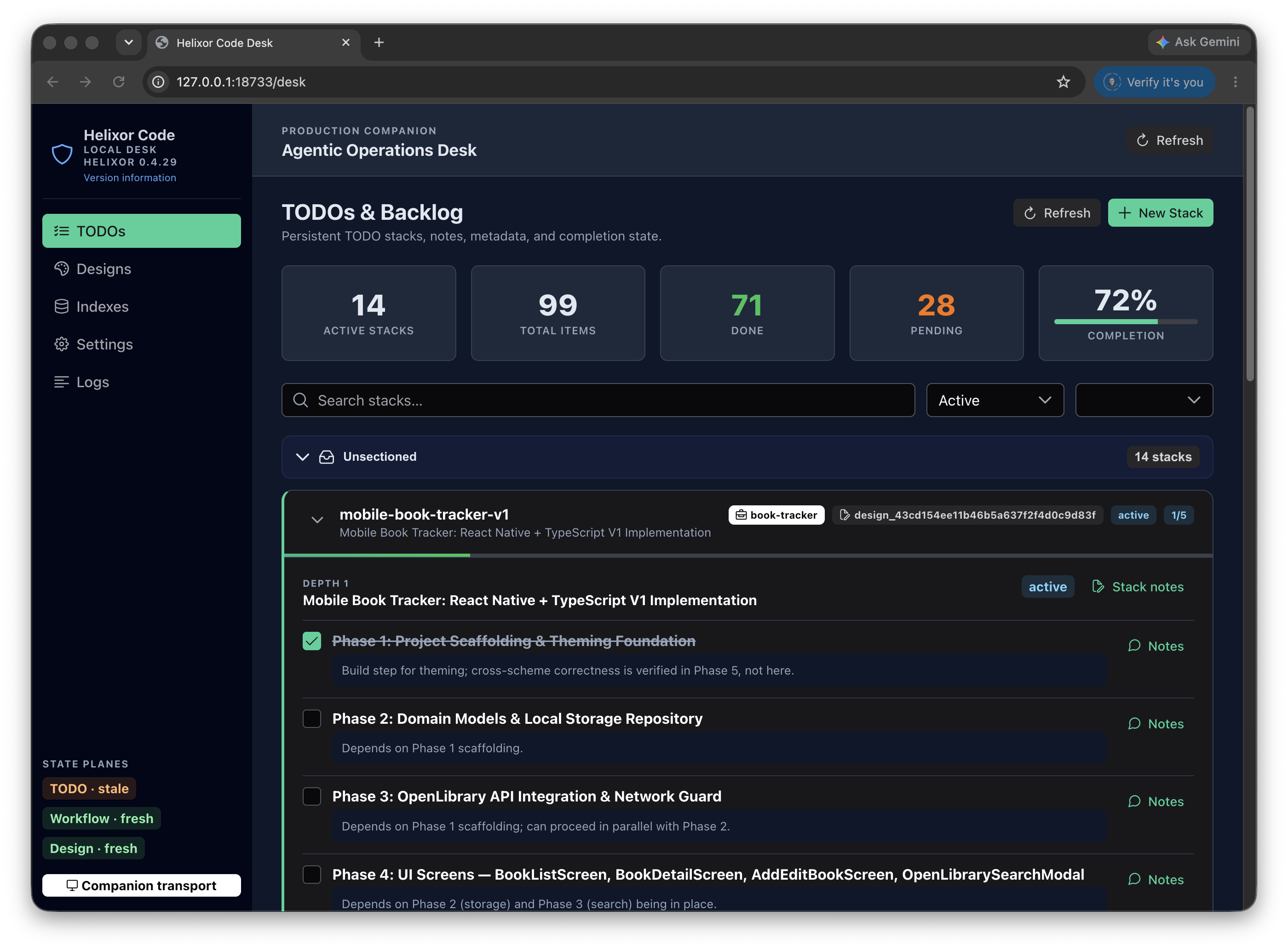
Explore the browser desk interface at Local Desk Guide and appliance status at Menu Bar Tray Guide.
10 MCP Tool Reference
Once connected, your agent has access to canonical Helixor MCP tools:
Code Intelligence Tools
| Tool | Capability | Example Agent Prompt |
|---|
code.search |
Structural AST search (definitions, usages, bonds, motifs). |
"Where is the JWT token verified in the auth middleware?" |
code.impact.analyze |
Impact analysis across APIs, models, tests, and call graphs. |
"What components will break if I modify UserSession.role?" |
code.tests.find |
Reverse query: finds tests covering specific behaviors. |
"Find test cases covering payment webhook retries." |
code.review |
Architectural quality and motif assessment. |
"Review the auth package for anti-patterns and circular bonds." |
code.diff |
Structural concept and working-tree diffs. |
"Show structural changes between main and this branch." |
Durable Planning & Team Memory Tools
| Tool | Capability | Example Agent Prompt |
|---|
brain.todo |
LIFO subject-scoped stack of TODO frames (push, peek, update, pop). |
"Create a TODO stack for refactoring payments and mark step 1 done." |
brain.design |
Durable design documents with phase lifecycle tracking. |
"Save our architectural design decisions for the database migration." |
workspace.get |
Reads shared context, pinned decisions, and channel updates. |
"What decisions did the team pin in the release channel today?" |
workspace.act |
Posts updates and pins decisions for cross-agent team handoff. |
"Post a summary of the auth refactor to the workspace channel." |
Complete schema definitions and parameter guides are listed in the MCP Tools Reference.
11 Team Hub & Multi-Developer Synchronization
Collaborate across engineering teams on shared codebases with a spoke-and-hub architecture:
helixor login https://code.helixor.dev
- Local Security: Source code and AST indexes remain local on each developer's machine (spoke).
- Shared Memory: TODO stacks, designs, and workspace channels synchronize securely through the Hub.
- Zero Network Friction: No VPN or inbound port forwarding required.
Read about enterprise network architecture in Hub-and-Spoke Overview.
12 Maintenance & Troubleshooting
One-Command Recovery (helixor repair):
If an agent integration goes stale, background processes conflict, or registrations mismatch, run:
helixor repair
helixor repair cleans up orphaned listeners, restarts the companion daemon, and re-validates MCP configurations across all installed agents.
Upgrading the CLI:
helixor update
Clean Uninstallation:
helixor uninstall
helixor uninstall --yes
helixor uninstall --yes --forget-login
See troubleshooting recipes in Reconciliation and Recovery Docs.
13 Quick Command Summary
helixor init
helixor login https://code.helixor.dev
helixor doctor
helixor status
helixor up
helixor down
helixor repair
helixor update
helixor agent install claude
helixor agent install codex
helixor agent install antigravity
helixor agent install gemini
helixor agent install grok
helixor mcp-config
helixor index /path/to/repo
helixor index-reset --yes